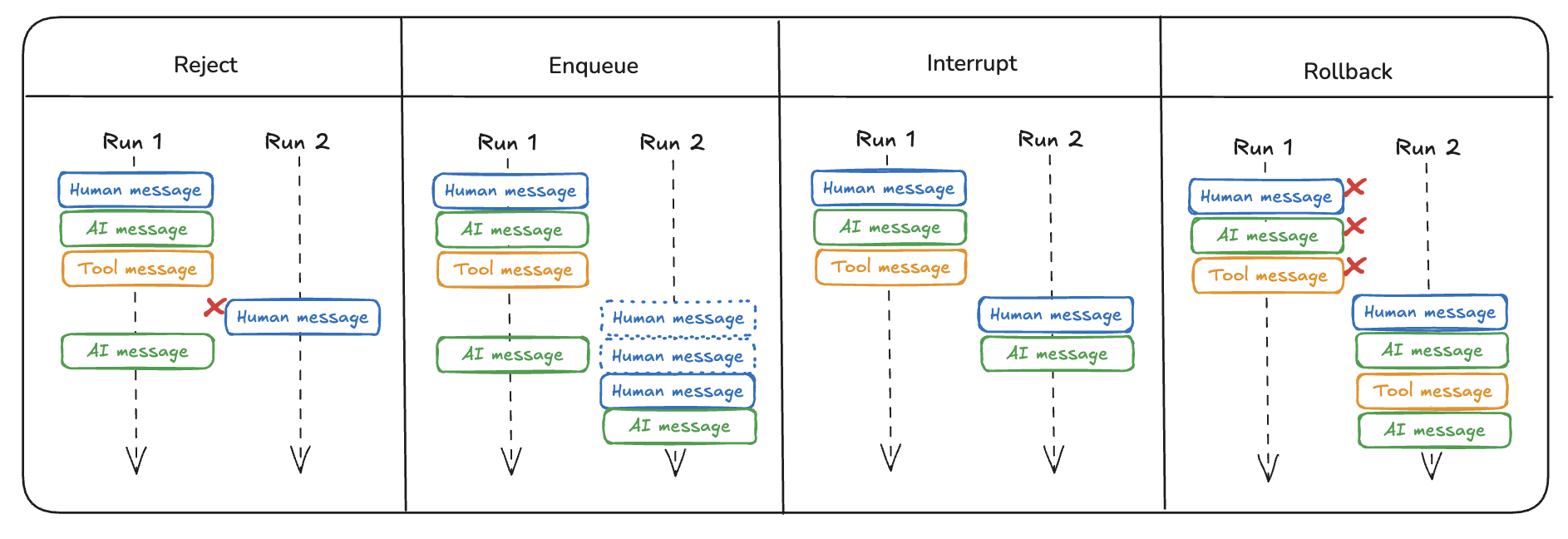
더블 텍스팅 (Double Texting)
특히 채팅 애플리케이션에서 더블 텍스팅(사용자가 AI의 응답을 기다리지 않고 연속으로 메시지를 보내는 행위)을 원활하게 처리하는 것은 실제 사용 시나리오를 다루는 데 중요합니다.
사용자는 이전 실행이 완료되기 전에 여러 메시지를 연속으로 보낼 수 있으며, 우리는 이 상황을 자연스럽게 처리해야 합니다.
거부 (Reject)
간단한 접근 방식은 현재 실행이 완료될 때까지 새로운 모든 실행을 거부하는 것입니다.
%%capture --no-stderr
%pip install -U langgraph_sdk
from langgraph_sdk import get_client
url_for_cli_deployment = "http://localhost:8123"
client = get_client(url=url_for_cli_deployment)import httpx
from langchain_core.messages import HumanMessage
# 스레드를 생성합니다.
thread = await client.threads.create()
# To-Do(할 일)들을 정의합니다.
user_input_1 = "DI 수리 업체에 후속 조치하는 To-Do를 추가해줘."
user_input_2 = "서랍장을 벽에 고정하는 To-Do를 추가해줘."
config = {"configurable": {"user_id": "Test-Double-Texting"}}
graph_name = "task_maistro"
# 첫 번째 실행을 시작합니다.
run = await client.runs.create(
thread["thread_id"],
graph_name,
input={"messages": [HumanMessage(content=user_input_1)]},
config=config,
)
# 첫 번째 실행이 끝나기 전에 두 번째 실행을 시도합니다 (더블 텍스팅).
# multitask_strategy="reject"는 동시 실행을 거부합니다.
try:
await client.runs.create(
thread["thread_id"],
graph_name,
input={"messages": [HumanMessage(content=user_input_2)]},
config=config,
multitask_strategy="reject", # 동시 실행 거부
)
except httpx.HTTPStatusError as e:
# 예상대로 HTTPStatusError가 발생하여 동시 실행이 거부됩니다.
print("동시 실행 시작 실패:", e)Failed to start concurrent run Client error '409 Conflict' for url 'http://localhost:8123/threads/2b58630e-00fd-4c35-afad-a6b59e9b9104/runs'
For more information check: https://developer.mozilla.org/en-US/docs/Web/HTTP/Status/409
from langchain_core.messages import convert_to_messages

# 첫 번째 실행이 완료될 때까지 기다립니다.
await client.runs.join(thread["thread_id"], run["run_id"])

# 스레드의 최종 상태를 가져옵니다.
state = await client.threads.get_state(thread["thread_id"])

# 최종 상태에 있는 메시지들을 보기 좋게 출력합니다.
for m in convert_to_messages(state["values"]["messages"]):
m.pretty_print()================================[1m Human Message [0m=================================
Add a ToDo to follow-up with DI Repairs.
==================================[1m Ai Message [0m==================================
Tool Calls:
UpdateMemory (call_6xqHubCPNufS0bg4tbUxC0FU)
Call ID: call_6xqHubCPNufS0bg4tbUxC0FU
Args:
update_type: todo
=================================[1m Tool Message [0m=================================
New ToDo created:
Content: {'task': 'Follow-up with DI Repairs', 'time_to_complete': 30, 'deadline': None, 'solutions': ['Call DI Repairs customer service', 'Email DI Repairs support', 'Check DI Repairs website for updates'], 'status': 'not started'}
==================================[1m Ai Message [0m==================================
I've added a task to follow-up with DI Repairs to your ToDo list. If there's anything else you need, feel free to let me know!
큐에 추가 (Enqueue)
현재 실행이 완료될 때까지 들어오는 새로운 모든 실행을 대기열(큐)에 추가할 수 있습니다.
# 새 스레드를 생성합니다.
thread = await client.threads.create()

# 새로운 To-Do(할 일)들을 생성합니다.
user_input_1 = "이번 주말에 Erik에게 티셔츠 선물을 보내는 To-Do를 추가해줘."
user_input_2 = "금요일까지 현금 찾아서 보모님께 2주치 급여를 드리는 To-Do를 추가해줘."
config = {"configurable": {"user_id": "Test-Double-Texting"}}
graph_name = "task_maistro"

# 첫 번째 실행을 시작합니다.
first_run = await client.runs.create(
    thread["thread_id"],
    graph_name,
    input={"messages": [HumanMessage(content=user_input_1)]},
    config=config,
)

# 첫 번째 실행이 끝나기 전에 두 번째 실행을 시도합니다.
# multitask_strategy="enqueue"는 이 요청을 대기열(큐)에 추가하여 순차적으로 처리되도록 합니다.
second_run = await client.runs.create(
    thread["thread_id"],
    graph_name,
    input={"messages": [HumanMessage(content=user_input_2)]},
    config=config,
    multitask_strategy="enqueue",  # 대기열(큐)에 추가
)

# Wait until the second run completes
await client.runs.join(thread["thread_id"], second_run["run_id"])

# Get the state of the thread
state = await client.threads.get_state(thread["thread_id"])
for m in convert_to_messages(state["values"]["messages"]):
m.pretty_print()================================[1m Human Message [0m=================================
Send Erik his t-shirt gift this weekend.
==================================[1m Ai Message [0m==================================
Tool Calls:
UpdateMemory (call_svTeXPmWGTLY8aQ8EifjwHAa)
Call ID: call_svTeXPmWGTLY8aQ8EifjwHAa
Args:
update_type: todo
=================================[1m Tool Message [0m=================================
New ToDo created:
Content: {'task': 'Send Erik his t-shirt gift', 'time_to_complete': 30, 'deadline': '2024-11-19T23:59:00', 'solutions': ['Wrap the t-shirt', "Get Erik's address", 'Visit the post office', 'Choose a delivery service'], 'status': 'not started'}
==================================[1m Ai Message [0m==================================
I've updated your ToDo list to send Erik his t-shirt gift this weekend. If there's anything else you need, feel free to let me know!
================================[1m Human Message [0m=================================
Get cash and pay nanny for 2 weeks. Do this by Friday.
==================================[1m Ai Message [0m==================================
Tool Calls:
UpdateMemory (call_Cq0Tfn6yqccHH8n0DOucz5OQ)
Call ID: call_Cq0Tfn6yqccHH8n0DOucz5OQ
Args:
update_type: todo
=================================[1m Tool Message [0m=================================
New ToDo created:
Content: {'task': 'Get cash and pay nanny for 2 weeks', 'time_to_complete': 15, 'deadline': '2024-11-17T23:59:00', 'solutions': ['Visit the ATM', 'Calculate the total amount for 2 weeks', 'Hand over the cash to the nanny'], 'status': 'not started'}
Document af1fe011-f3c5-4c1c-b98b-181869bc2944 updated:
Plan: Update the deadline for sending Erik his t-shirt gift to this weekend, which is by 2024-11-17.
Added content: 2024-11-17T23:59:00
==================================[1m Ai Message [0m==================================
I've updated your ToDo list to ensure you get cash and pay the nanny for 2 weeks by Friday. Let me know if there's anything else you need!
중단 (Interrupt)
중단(interrupt) 전략을 사용하면, 현재 실행을 중단시키면서도 그 시점까지 수행된 모든 작업 내용은 저장할 수 있습니다.
import asyncio

# 새 스레드를 생성합니다.
thread = await client.threads.create()

# 새로운 요청들을 정의합니다.
user_input_1 = "내일까지 해야 할 내 To-Do(할 일)들을 요약해줘."
user_input_2 = (
    "아니야, 그냥 다음 주 금요일까지 추수감사절에 쓸 햄을 주문하는 To-Do를 생성해줘."
)
config = {"configurable": {"user_id": "Test-Double-Texting"}}
graph_name = "task_maistro"

# 첫 번째 실행(요약 요청)을 시작합니다.
interrupted_run = await client.runs.create(
    thread["thread_id"],
    graph_name,
    input={"messages": [HumanMessage(content=user_input_1)]},
    config=config,
)

# 첫 번째 실행이 스레드에 일부 기록될 수 있도록 잠시 기다립니다.
await asyncio.sleep(1)

# 첫 번째 실행을 중단(interrupt)하고 두 번째 실행(새 To-Do 생성)을 시작합니다.
second_run = await client.runs.create(
    thread["thread_id"],
    graph_name,
    input={"messages": [HumanMessage(content=user_input_2)]},
    config=config,
    multitask_strategy="interrupt",  # 중단
)

# 두 번째 실행이 완료될 때까지 기다립니다.
await client.runs.join(thread["thread_id"], second_run["run_id"])

# 스레드의 최종 상태를 가져옵니다.
state = await client.threads.get_state(thread["thread_id"])
for m in convert_to_messages(state["values"]["messages"]):
m.pretty_print()================================[1m Human Message [0m=================================
Give me a summary of my ToDos due tomrrow.
================================[1m Human Message [0m=================================
Never mind, create a ToDo to Order Ham for Thanksgiving by next Friday.
==================================[1m Ai Message [0m==================================
Tool Calls:
UpdateMemory (call_Rk80tTSJzik2oY44tyUWk8FM)
Call ID: call_Rk80tTSJzik2oY44tyUWk8FM
Args:
update_type: todo
=================================[1m Tool Message [0m=================================
New ToDo created:
Content: {'task': 'Order Ham for Thanksgiving', 'time_to_complete': 30, 'deadline': '2024-11-22T23:59:59', 'solutions': ['Check local grocery stores for availability', 'Order online from a specialty meat provider', 'Visit a local butcher shop'], 'status': 'not started'}
==================================[1m Ai Message [0m==================================
I've added the task "Order Ham for Thanksgiving" to your ToDo list with a deadline of next Friday. If you need any more help, feel free to ask!
초기 실행이 저장되었으며, 상태가 interrupted인 것을 확인할 수 있습니다.
# 첫 번째 실행이 중단(interrupted)되었는지 확인합니다.
print((await client.runs.get(thread["thread_id"], interrupted_run["run_id"]))["status"])
interrupted
롤백 (Rollback)
롤백(rollback) 전략을 사용하면 이전 그래프 실행을 중단하고 삭제한 후, 연속으로 입력된(double-texted) 메시지를 사용하여 새로운 실행을 시작할 수 있습니다.
# 새 스레드를 생성합니다.
thread = await client.threads.create()

# 새로운 요청들을 정의합니다.
user_input_1 = "요가 학원에 전화해서 예약 잡는 To-Do를 추가해줘."
user_input_2 = "아니, 그냥 일요일에 요가 학원에 직접 들르는 To-Do를 추가해줘."
config = {"configurable": {"user_id": "Test-Double-Texting"}}
graph_name = "task_maistro"

# 첫 번째 실행을 시작합니다.
rolled_back_run = await client.runs.create(
    thread["thread_id"],
    graph_name,
    input={"messages": [HumanMessage(content=user_input_1)]},
    config=config,
)

# 첫 번째 실행을 롤백(삭제)하고 두 번째 실행을 시작합니다.
# multitask_strategy="rollback"은 이전 실행을 취소하고 현재 요청으로 대체합니다.
second_run = await client.runs.create(
    thread["thread_id"],
    graph_name,
    input={"messages": [HumanMessage(content=user_input_2)]},
    config=config,
    multitask_strategy="rollback",
)

# 두 번째 실행이 완료될 때까지 기다립니다.
await client.runs.join(thread["thread_id"], second_run["run_id"])

# 스레드의 최종 상태를 가져옵니다.
state = await client.threads.get_state(thread["thread_id"])
for m in convert_to_messages(state["values"]["messages"]):
m.pretty_print()================================[1m Human Message [0m=================================
Actually, add a ToDo to drop by Yoga in person on Sunday.
==================================[1m Ai Message [0m==================================
It looks like the task "Drop by Yoga in person" is already on your ToDo list with a deadline of November 19, 2024. Would you like me to update the deadline to the upcoming Sunday instead?
첫번째 실행이 삭제되었습니다.
# 원본 실행이 삭제되었는지 확인합니다.
try:
    # 이 호출은 롤백되었으므로 실패해야 합니다.
    await client.runs.get(thread["thread_id"], rolled_back_run["run_id"])
except httpx.HTTPStatusError as _:
    # 예상대로 오류가 발생하면, 정상적으로 삭제된 것입니다.
    print("원본 실행이 정상적으로 삭제되었습니다.")
Original run was correctly deleted
요약
지금까지 다룬 모든 (더블 텍스팅 처리) 방법들을 다음과 같이 요약할 수 있습니다: