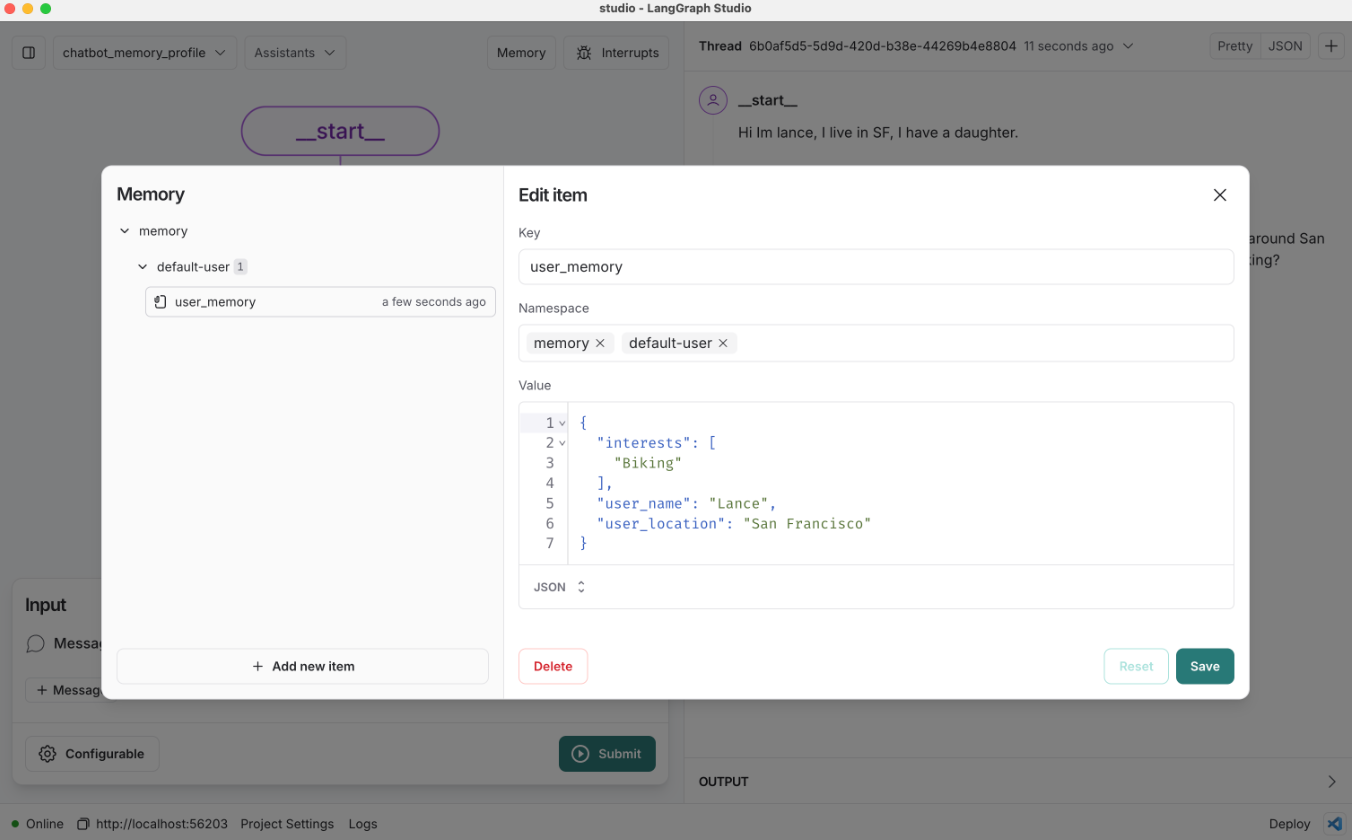
프로필 스키마를 사용하는 챗봇
복습
우리는 장기 기억을 저장하고 검색하는 방법으로 LangGraph 메모리 스토어를 소개했습니다.
또한 단기 (스레드 내) 메모리와 장기 (스레드 간) 메모리를 모두 사용하는 간단한 챗봇을 만들었습니다.
이 챗봇은 사용자와 대화하는 중에 실시간으로”in the hot path” 장기 의미 기억(semantic memory)(사용자에 대한 사실)을 저장했습니다.
목표
이전 챗봇은 메모리를 문자열로 저장했습니다. 하지만 실제로는 메모리에 구조를 부여하는 것이 더 유용할 때가 많습니다.
예를 들어, 메모리는 지속적으로 업데이트되는 단일 스키마가 될 수 있습니다.
이번 예제에서는 이것을 단일 사용자 프로필로 만들어 보겠습니다.
챗봇을 확장하여 의미 기억을 단일 사용자 프로필에 저장하도록 만들 것입니다.
또한, 새로운 정보로 이 스키마를 업데이트하기 위해 Trustcall 라이브러리를 소개할 것입니다.
%%capture --no-stderr

%pip install -U langchain_openai langgraph trustcall langchain_core
from dotenv import load_dotenv
load_dotenv("../.env", override=True)True
import os
import getpass


def _set_env(var: str):
    env_value = os.environ.get(var)
    if not env_value:
        env_value = getpass.getpass(f"{var}: ")

os.environ[var] = env_value_set_env("LANGSMITH_API_KEY")
os.environ["LANGSMITH_TRACING"] = "true"
os.environ["LANGSMITH_PROJECT"] = "langchain-academy"사용자 프로필 스키마 정의
파이썬에는 TypedDict, 딕셔너리, JSON, Pydantic과 같이 구조화된 데이터를 위한 다양한 타입이 있습니다.
먼저 TypedDict를 사용하여 사용자 프로필 스키마를 정의해 보겠습니다.
from typing import TypedDict, List


class UserProfile(TypedDict):
    """타입이 지정된 필드를 가진 사용자 프로필 스키마"""

    user_name: str  # 사용자가 선호하는 이름
    interests: List[str]  # 사용자의 관심사 목록
스키마를 저장소에 저장하기
LangGraph 저장소는 모든 파이썬 딕셔너리를 value로 받습니다.
# TypedDict 인스턴스
user_profile: UserProfile = {
    "user_name": "랜스",
    "interests": ["자전거 타기", "기술", "커피"],
}
user_profile
{'user_name': '랜스', 'interests': ['자전거 타기', '기술', '커피']}
put 메서드를 사용하여 TypedDict를 스토어에 저장합니다.
import uuid
from langgraph.store.memory import InMemoryStore

# 인메모리 저장소 초기화
in_memory_store = InMemoryStore()

# 저장할 메모리의 네임스페이스
user_id = "1"
namespace_for_memory = (user_id, "memory")

# 네임스페이스에 메모리를 키와 값으로 저장
key = "user_profile"
value = user_profile
in_memory_store.put(namespace_for_memory, key, value)search를 사용하여 네임스페이스로 저장소에서 객체를 검색합니다.
# 검색
for m in in_memory_store.search(namespace_for_memory):
    print(m.dict())
{'namespace': ['1', 'memory'], 'key': 'user_profile', 'value': {'user_name': '랜스', 'interests': ['자전거 타기', '기술', '커피']}, 'created_at': '2025-10-02T08:02:49.497091+00:00', 'updated_at': '2025-10-02T08:02:49.497094+00:00', 'score': None}
또한 get을 사용하여 네임스페이스와 키로 특정 객체를 검색할 수도 있습니다.
# 네임스페이스와 키로 메모리 가져오기
profile = in_memory_store.get(namespace_for_memory, "user_profile")
profile.value
{'user_name': '랜스', 'interests': ['자전거 타기', '기술', '커피']}
프로필 스키마를 사용하는 챗봇
이제 메모리에 대한 스키마를 지정하고 스토어에 저장하는 방법을 알게 되었습니다.
그렇다면, 이 특정 스키마에 맞춰 어떻게 메모리를 생성할 수 있을까요?
우리가 만드는 챗봇에서는 사용자와의 채팅으로부터 메모리를 생성하고자 합니다.
바로 이럴 때 구조화된 출력(structured outputs)이라는 개념이 유용합니다.
LangChain의 채팅 모델 인터페이스에는 구조화된 출력을 강제하는 with_structured_output 메서드가 있습니다.
이 기능은 출력이 특정 스키마를 따르도록 강제하고, 그 결과를 자동으로 파싱해주기 때문에 유용합니다.
_set_env("OPENAI_API_KEY")생성한 UserProfile 스키마를 with_structured_output 메서드에 전달해 보겠습니다.
그런 다음 메시지 목록으로 채팅 모델을 호출하여 스키마를 따르는 구조화된 출력을 얻을 수 있습니다.
from pydantic import BaseModel, Field
from langchain_core.messages import HumanMessage
from langchain_openai import ChatOpenAI

# 모델 초기화
model = ChatOpenAI(model="gpt-4o", temperature=0)

# 스키마를 모델에 바인딩
model_with_structure = model.with_structured_output(UserProfile)

# 스키마와 일치하는 구조화된 출력을 생성하기 위해 모델 호출
structured_output = model_with_structure.invoke(
    [HumanMessage("제 이름은 랜스입니다. 자전거 타는 걸 좋아합니다.")]
)
structured_output
{'user_name': '랜스', 'interests': ['자전거 타기']}
이제 이것을 우리 챗봇과 함께 사용해 봅시다.
이는 write_memory 함수에 약간의 변경만 필요합니다.
위에서 정의한 model_with_structure를 사용하여 스키마와 일치하는 프로필을 생성합니다.
from IPython.display import Image, display
from langgraph.checkpoint.memory import MemorySaver
from langgraph.graph import StateGraph, MessagesState, START, END
from langgraph.store.base import BaseStore
from langchain_core.messages import HumanMessage, SystemMessage, AIMessage
from langchain_core.runnables.config import RunnableConfig

# 챗봇 지침
MODEL_SYSTEM_MESSAGE = """당신은 사용자에 대한 정보를 제공하는 기억력을 가진 유용한 어시스턴트입니다.
이 사용자에 대한 기억이 있다면, 그것을 사용하여 응답을 개인화하세요.
여기 기억이 있습니다 (비어 있을 수 있습니다): {memory}"""

# 채팅 기록과 기존 메모리에서 새 메모리 생성
CREATE_MEMORY_INSTRUCTION = """사용자의 채팅 기록을 기반으로 사용자 프로필 메모리를 생성하거나 업데이트하세요.
이것은 장기 기억을 위해 저장될 것입니다. 기존 메모리가 있다면 간단히 업데이트하세요.
여기 기존 메모리가 있습니다 (비어 있을 수 있습니다): {memory}"""


def call_model(state: MessagesState, config: RunnableConfig, store: BaseStore):
    """저장소에서 메모리를 로드하고 이를 사용하여 챗봇의 응답을 개인화합니다."""
    # 설정에서 사용자 ID 가져오기
    user_id = config["configurable"]["user_id"]

    # 저장소에서 메모리 검색
    namespace = ("memory", user_id)
    existing_memory = store.get(namespace, "user_memory")

    # 시스템 프롬프트를 위한 메모리 형식 지정
    if existing_memory and existing_memory.value:
        memory_dict = existing_memory.value
        formatted_memory = (
            f"이름: {memory_dict.get('user_name', '알 수 없음')}\n"
            f"관심사: {', '.join(memory_dict.get('interests', []))}"
        )
    else:
        formatted_memory = None

    # 시스템 프롬프트에서 메모리 형식 지정
    system_msg = MODEL_SYSTEM_MESSAGE.format(memory=formatted_memory)

    # 메모리와 채팅 기록을 사용하여 응답
    response = model.invoke([SystemMessage(content=system_msg)] + state["messages"])

    return {"messages": response}


def write_memory(state: MessagesState, config: RunnableConfig, store: BaseStore):
    """채팅 기록을 검토하고 저장소에 메모리를 저장합니다."""

    # 설정에서 사용자 ID 가져오기
    user_id = config["configurable"]["user_id"]

    # 저장소에서 기존 메모리 검색
    namespace = ("memory", user_id)
    existing_memory = store.get(namespace, "user_memory")

    # 시스템 프롬프트를 위한 메모리 형식 지정
    if existing_memory and existing_memory.value:
        memory_dict = existing_memory.value
        formatted_memory = (
            f"이름: {memory_dict.get('user_name', '알 수 없음')}\n"
            f"관심사: {', '.join(memory_dict.get('interests', []))}"
        )
    else:
        formatted_memory = None

    # 지침에서 기존 메모리 형식 지정
    system_msg = CREATE_MEMORY_INSTRUCTION.format(memory=formatted_memory)

    # 스키마와 일치하는 구조화된 출력을 생성하기 위해 모델 호출
    new_memory = model_with_structure.invoke(
        [SystemMessage(content=system_msg)] + state["messages"]
    )

    # 기존 사용자 프로필 메모리를 덮어씁니다.
    key = "user_memory"
    store.put(namespace, key, new_memory)
# 그래프 정의
builder = StateGraph(MessagesState)
builder.add_node("call_model", call_model)
builder.add_node("write_memory", write_memory)
builder.set_entry_point("call_model")
builder.add_edge("call_model", "write_memory")
builder.set_finish_point("write_memory")
# 장기(스레드 간) 메모리를 위한 저장소
across_thread_memory = InMemoryStore()
# 단기(스레드 내) 메모리를 위한 체크포인터
within_thread_memory = MemorySaver()
# 체크포인터와 저장소를 사용하여 그래프 컴파일
graph = builder.compile(checkpointer=within_thread_memory, store=across_thread_memory)
# 보기
display(Image(graph.get_graph(xray=1).draw_mermaid_png()))
# 단기(스레드 내) 메모리를 위해 스레드 ID를 제공합니다.
# 장기(스레드 간) 메모리를 위해 사용자 ID를 제공합니다.
config = {"configurable": {"thread_id": "1", "user_id": "1"}}

# 사용자 입력
input_messages = [
    HumanMessage(
        content="안녕하세요, 제 이름은 Lance이고 샌프란시스코 주변에서 자전거 타는 것과 빵집에서 먹는 것을 좋아합니다."
    )
]

# 그래프 실행
for chunk in graph.stream(
    {"messages": input_messages},
    config,
    stream_mode="values",
):
chunk["messages"][-1].pretty_print()================================[1m Human Message [0m=================================
안녕하세요, 제 이름은 Lance이고 샌프란시스코 주변에서 자전거 타는 것과 빵집에서 먹는 것을 좋아합니다.
==================================[1m Ai Message [0m==================================
안녕하세요, Lance! 샌프란시스코는 자전거 타기에 정말 멋진 장소죠. 특히 경치가 아름다운 곳이 많아서 더욱 즐거울 것 같아요. 그리고 빵집에서 맛있는 빵을 먹는 것도 큰 즐거움이죠. 혹시 샌프란시스코에서 추천할 만한 자전거 경로나 빵집이 있나요?
저장소의 메모리를 확인해 봅시다.
메모리가 우리 스키마와 일치하는 딕셔너리임을 알 수 있습니다.
# 저장할 메모리의 네임스페이스
user_id = "1"
namespace = ("memory", user_id)
existing_memory = across_thread_memory.get(namespace, "user_memory")
existing_memory.value
{'user_name': 'Lance',
'interests': ['cycling around San Francisco', 'eating at bakeries']}
어떤 경우에 실패할 수 있을까요?
with_structured_output은 매우 유용하지만, 더 복잡한 스키마로 작업하는 경우에는 어떻게 될까요?
더 복잡한 스키마의 예시가 여기에 있으며, 아래에서 테스트해 보겠습니다.
이것은 사용자의 커뮤니케이션 및 트러스트 폴(trust fall)에 대한 선호도를 설명하는 Pydantic 모델입니다.
from typing import List, Optional


class OutputFormat(BaseModel):
    preference: str
    sentence_preference_revealed: str


class TelegramPreferences(BaseModel):
    preferred_encoding: Optional[List[OutputFormat]] = None
    favorite_telegram_operators: Optional[List[OutputFormat]] = None
    preferred_telegram_paper: Optional[List[OutputFormat]] = None


class MorseCode(BaseModel):
    preferred_key_type: Optional[List[OutputFormat]] = None
    favorite_morse_abbreviations: Optional[List[OutputFormat]] = None


class Semaphore(BaseModel):
    preferred_flag_color: Optional[List[OutputFormat]] = None
    semaphore_skill_level: Optional[List[OutputFormat]] = None


class TrustFallPreferences(BaseModel):
    preferred_fall_height: Optional[List[OutputFormat]] = None
    trust_level: Optional[List[OutputFormat]] = None
    preferred_catching_technique: Optional[List[OutputFormat]] = None


class CommunicationPreferences(BaseModel):
    telegram: TelegramPreferences
    morse_code: MorseCode
    semaphore: Semaphore


class UserPreferences(BaseModel):
    communication_preferences: CommunicationPreferences
    trust_fall_preferences: TrustFallPreferences


class TelegramAndTrustFallPreferences(BaseModel):
    pertinent_user_preferences: UserPreferences
이제 with_structured_output 메서드를 사용하여 이 스키마의 추출을 시도해 보겠습니다.
from pydantic import ValidationError

# 스키마를 모델에 바인딩
model_with_structure = model.with_structured_output(TelegramAndTrustFallPreferences)

# 대화
conversation = """교환원: 전보를 어떻게 도와드릴까요, 손님?
고객: 신뢰 낙하 운동에 대한 메시지를 보내야 합니다.
교환원: 알겠습니다. 모스 부호인가요, 아니면 표준 인코딩인가요?
고객: 모스 부호로 부탁합니다. 스트레이트 키를 사용하는 것을 좋아하거든요.
교환원: 훌륭합니다. 메시지가 무엇인가요?
고객: 더 높은 낙하에 준비되었고, 잡는 데는 다이아몬드 포메이션을 선호한다고 전해주세요.
교환원: 완료되었습니다. 이 대담한 메시지에 저희 \"데어데블\" 용지를 사용할까요?
고객: 완벽해요! 가장 빠른 비둘기 전송으로 보내주세요.
교환원: 한 시간 안에 도착할 겁니다, 손님."""

# 모델 호출
try:
    model_with_structure.invoke(f"""다음 대화에서 선호도를 추출하세요:
    <convo>
    {conversation}
    </convo>""")
except ValidationError as e:
print(e)gpt-4o와 같은 고성능 모델을 사용하더라도, 더 복잡한 스키마를 단순하게 추출하려고 하면 실패하기 쉽습니다.
프로필 스키마 생성 및 업데이트를 위한 Trustcall
보시다시피, 스키마 작업은 까다로울 수 있습니다.
복잡한 스키마는 추출하기 어려울 수 있습니다.
또한, 간단한 스키마를 업데이트하는 것조차 어려울 수 있습니다.
위에서 만든 챗봇을 생각해 봅시다.
새로운 메모리를 저장하기로 할 때마다 프로필 스키마를 처음부터 다시 생성했습니다.
이는 스키마에 매번 다시 생성해야 할 정보가 많이 포함되어 있는 경우 모델 토큰을 낭비할 수 있으므로 비효율적입니다.
더 나쁜 것은, 프로필을 처음부터 다시 생성할 때 정보가 손실될 수 있다는 점입니다.
이러한 문제를 해결하는 것이 바로 TrustCall의 동기입니다!
이것은 LangChain 팀의 Will Fu-Hinthorn이 개발한 JSON 스키마 업데이트를 위한 오픈 소스 라이브러리입니다.
이 라이브러리는 바로 메모리 작업 중에 겪는 이러한 어려움에서 영감을 얻었습니다.
먼저, 이 메시지 목록에서 TrustCall을 사용하여 간단하게 추출하는 방법을 보여드리겠습니다.
# 대화
conversation = [
    HumanMessage(content="안녕하세요, 저는 Lance입니다."),
    AIMessage(content="만나서 반가워요, Lance."),
    HumanMessage(content="저는 샌프란시스코 주변에서 자전거 타는 것을 정말 좋아해요."),
]create_extractor를 사용할 때, 모델과 함께 우리의 스키마를 tool(도구)로 전달합니다.
TrustCall에서는 다양한 방법으로 스키마를 제공할 수 있습니다.
예를 들어, JSON 객체/파이썬 딕셔너리 또는 Pydantic 모델을 전달할 수 있습니다.
내부적으로, TrustCall은 입력된 메시지 목록으로부터 구조화된 출력을 생성하기 위해 tool calling(도구 호출)을 사용합니다.
Trustcall이 구조화된 출력을 생성하도록 강제하려면, tool_choice 인자에 스키마 이름을 포함시키면 됩니다.
위 대화를 사용하여 추출기를 호출할 수 있습니다.
from trustcall import create_extractor


# 스키마
class UserProfile(BaseModel):
    """타입이 지정된 필드를 가진 사용자 프로필 스키마"""

    user_name: str = Field(description="사용자가 선호하는 이름")
    interests: List[str] = Field(description="사용자의 관심사 목록")


# 모델 초기화
model = ChatOpenAI(model="gpt-4o", temperature=0)

# 추출기 생성
trustcall_extractor = create_extractor(
    model,
    tools=[UserProfile],
    tool_choice="UserProfile",  # UserProfile 도구 사용을 강제합니다.
)

# 지침
system_msg = "다음 대화에서 사용자 프로필을 추출하세요."

# 추출기 호출
result = trustcall_extractor.invoke(
    {"messages": [SystemMessage(content=system_msg)] + conversation}
)
추출기를 호출하면 몇 가지를 얻게 됩니다:
-
messages: 도구 호출을 포함하는AIMessages목록. -
responses: 스키마와 일치하는 결과로 파싱된 도구 호출. -
response_metadata: 기존 도구 호출을 업데이트할 때 적용됩니다. 어떤 응답이 어떤 기존 객체에 해당하는지를 나타냅니다.
for m in result["messages"]:
m.pretty_print()==================================[1m Ai Message [0m==================================
Tool Calls:
UserProfile (call_mYEyeID6cZ5P6gG7hblGtKap)
Call ID: call_mYEyeID6cZ5P6gG7hblGtKap
Args:
user_name: Lance
interests: ['자전거 타기', '샌프란시스코']
schema = result["responses"]
schema
[UserProfile(user_name='Lance', interests=['자전거 타기', '샌프란시스코'])]
schema[0].model_dump(){'user_name': 'Lance', 'interests': ['자전거 타기', '샌프란시스코']}
result["response_metadata"][{'id': 'call_uAEgIKFoah7yFoMC6LUVv4cs'}]
이제 이것을 사용하여 프로필을 수정(update) 하는 방법을 살펴보겠습니다.
수정 작업을 위해, TrustCall은 메시지 집합과 기존 스키마를 함께 입력으로 받습니다.
핵심 아이디어는 모델이 스키마의 관련 부분만 업데이트하도록 JSON Patch를 생성하게 하는 것입니다.
이 방법은 전체 스키마를 단순히 덮어쓰는 것보다 오류가 발생할 가능성이 적습니다.
또한 모델이 변경된 부분의 스키마만 생성하면 되므로 더 효율적입니다.
기존 스키마를 딕셔너리(dict)로 저장할 수 있습니다.
Pydantic 모델 인스턴스는 model_dump()를 사용하여 딕셔너리로 직렬화할 수 있습니다.
이것을 스키마 이름인 UserProfile과 함께 "existing" 인자에 전달합니다.
# 대화 업데이트
updated_conversation = [
    HumanMessage(content="안녕하세요, 저는 Lance입니다."),
    AIMessage(content="만나서 반가워요, Lance."),
    HumanMessage(content="저는 샌프란시스코 주변에서 자전거 타는 것을 정말 좋아해요."),
    AIMessage(content="샌프란시스코는 멋진 도시죠! 자전거 탄 후에는 어디로 가시나요?"),
    HumanMessage(content="자전거 탄 후에 빵집에 가는 것을 정말 좋아해요."),
]

# 지침 업데이트
system_msg = "다음 대화에서 새로운 정보를 통합하도록 메모리(JSON 문서)를 업데이트하세요"

# 업데이트된 지침과 해당 도구 이름(UserProfile)이 있는 기존 프로필로 추출기 호출
result = trustcall_extractor.invoke(
    {"messages": [SystemMessage(content=system_msg)] + updated_conversation},
    {"existing": {"UserProfile": schema[0].model_dump()}},
)
for m in result["messages"]:
m.pretty_print()==================================[1m Ai Message [0m==================================
Tool Calls:
UserProfile (call_RpJ3qNa8xD2Vvu7dkcJcw9r7)
Call ID: call_RpJ3qNa8xD2Vvu7dkcJcw9r7
Args:
user_name: Lance
interests: ['cycling around San Francisco', 'visiting bakeries']
result["response_metadata"][{'id': 'call_RpJ3qNa8xD2Vvu7dkcJcw9r7'}]
updated_schema = result["responses"][0]
updated_schema.model_dump()
{'user_name': 'Lance',
'interests': ['cycling around San Francisco', 'visiting bakeries']}
LangSmith 트레이스:
https://smith.langchain.com/public/229eae22-1edb-44c6-93e6-489124a43968/r
이제, 이전에 보았던 까다로운 스키마에 대해서도 Trustcall을 테스트해 봅시다.
bound = create_extractor(
    model,
    tools=[TelegramAndTrustFallPreferences],
    tool_choice="TelegramAndTrustFallPreferences",
)
# 대화
conversation = """교환원: 전보를 어떻게 도와드릴까요, 손님?
고객: 신뢰 낙하 운동에 대한 메시지를 보내야 합니다.
교환원: 알겠습니다. 모스 부호인가요, 아니면 표준 인코딩인가요?
고객: 모스 부호로 부탁합니다. 스트레이트 키를 사용하는 것을 좋아하거든요.
교환원: 훌륭합니다. 메시지가 무엇인가요?
고객: 더 높은 낙하에 준비되었고, 잡는 데는 다이아몬드 포메이션을 선호한다고 전해주세요.
교환원: 완료되었습니다. 이 대담한 메시지에 저희 \"데어데블\" 용지를 사용할까요?
고객: 완벽해요! 가장 빠른 비둘기 전송으로 보내주세요.
교환원: 한 시간 안에 도착할 겁니다, 손님."""
result = bound.invoke(
f"""다음 대화에서 선호도를 추출하세요:
<convo>
{conversation}
</convo>"""
)
# 선호도 추출
result["responses"][0]TelegramAndTrustFallPreferences(pertinent_user_preferences=UserPreferences(communication_preferences=CommunicationPreferences(telegram=TelegramPreferences(preferred_encoding=[OutputFormat(preference='standard encoding', sentence_preference_revealed='표준 인코딩')], favorite_telegram_operators=None, preferred_telegram_paper=[OutputFormat(preference='데어데블 용지', sentence_preference_revealed='데어데블 용지 사용')]), morse_code=MorseCode(preferred_key_type=[OutputFormat(preference='straight key', sentence_preference_revealed='스트레이트 키 사용')], favorite_morse_abbreviations=None), semaphore=Semaphore(preferred_flag_color=None, semaphore_skill_level=None)), trust_fall_preferences=TrustFallPreferences(preferred_fall_height=[OutputFormat(preference='higher', sentence_preference_revealed='더 높은 낙하')], trust_level=None, preferred_catching_technique=[OutputFormat(preference='diamond formation', sentence_preference_revealed='다이아몬드 포메이션')])))
트레이스:
https://smith.langchain.com/public/5cd23009-3e05-4b00-99f0-c66ee3edd06e/r
더 많은 예제는 여기에서 개요 비디오를 볼 수 있습니다.
프로필 스키마 업데이트 기능이 있는 챗봇
이제 Trustcall을 챗봇에 도입하여 메모리 프로필을 생성하고 업데이트해 봅시다.
from IPython.display import Image, display
from langchain_core.messages import HumanMessage, SystemMessage
from langgraph.graph import StateGraph, MessagesState, START, END
from langchain_core.runnables.config import RunnableConfig
from langgraph.checkpoint.memory import MemorySaver
from langgraph.store.base import BaseStore

# 모델 초기화
model = ChatOpenAI(model="gpt-4o", temperature=0)


# 스키마
class UserProfile(BaseModel):
    """사용자 프로필"""

    user_name: str = Field(description="사용자가 선호하는 이름")
    user_location: str = Field(description="사용자의 위치")
    interests: list = Field(description="사용자의 관심사 목록")


# 추출기 생성
trustcall_extractor = create_extractor(
    model,
    tools=[UserProfile],
    tool_choice="UserProfile",  # UserProfile 도구 사용을 강제합니다.
)

# 챗봇 지침
MODEL_SYSTEM_MESSAGE = """당신은 사용자에 대한 정보를 제공하는 기억력을 가진 유용한 어시스턴트입니다.
이 사용자에 대한 기억이 있다면, 그것을 사용하여 응답을 개인화하세요.
여기 기억이 있습니다 (비어 있을 수 있습니다): {memory}"""

# 추출 지침
TRUSTCALL_INSTRUCTION = (
    """다음 대화의 정보를 통합하여 메모리(JSON 문서)를 생성하거나 업데이트하세요:"""
)


def call_model(state: MessagesState, config: RunnableConfig, store: BaseStore):
    """저장소에서 메모리를 로드하고 이를 사용하여 챗봇의 응답을 개인화합니다."""

    # 설정에서 사용자 ID 가져오기
    user_id = config["configurable"]["user_id"]

    # 저장소에서 메모리 검색
    namespace = ("memory", user_id)
    existing_memory = store.get(namespace, "user_memory")

    # 시스템 프롬프트를 위한 메모리 형식 지정
    if existing_memory and existing_memory.value:
        memory_dict = existing_memory.value
        formatted_memory = (
            f"이름: {memory_dict.get('user_name', '알 수 없음')}\n"
            f"위치: {memory_dict.get('user_location', '알 수 없음')}\n"
            f"관심사: {', '.join(memory_dict.get('interests', []))}"
        )
    else:
        formatted_memory = None

    # 시스템 프롬프트에서 메모리 형식 지정
    system_msg = MODEL_SYSTEM_MESSAGE.format(memory=formatted_memory)

    # 메모리와 채팅 기록을 사용하여 응답
    response = model.invoke([SystemMessage(content=system_msg)] + state["messages"])
    return {"messages": response}


def write_memory(state: MessagesState, config: RunnableConfig, store: BaseStore):
    """채팅 기록을 검토하고 저장소에 메모리를 저장합니다."""

    # 설정에서 사용자 ID 가져오기
    user_id = config["configurable"]["user_id"]

    # 저장소에서 기존 메모리 검색
    namespace = ("memory", user_id)
    existing_memory = store.get(namespace, "user_memory")

    # 목록에서 값을 프로필로 가져와 JSON 문서로 변환
    existing_profile = (
        {"UserProfile": existing_memory.value} if existing_memory else None
    )

    # 추출기 호출
    result = trustcall_extractor.invoke(
        {
            "messages": [SystemMessage(content=TRUSTCALL_INSTRUCTION)]
            + state["messages"],
            "existing": existing_profile,
        }
    )
    # 업데이트된 프로필을 JSON 객체로 가져오기
    updated_profile = result["responses"][0].model_dump()

    # 업데이트된 프로필 저장
    key = "user_memory"
    store.put(namespace, key, updated_profile)
# 그래프 정의
builder = StateGraph(MessagesState)
builder.add_node("call_model", call_model)
builder.add_node("write_memory", write_memory)
builder.set_entry_point("call_model")
builder.add_edge("call_model", "write_memory")
builder.set_finish_point("write_memory")
# 장기(스레드 간) 메모리를 위한 저장소
across_thread_memory = InMemoryStore()
# 단기(스레드 내) 메모리를 위한 체크포인터
within_thread_memory = MemorySaver()
# 체크포인터와 저장소를 사용하여 그래프 컴파일
graph = builder.compile(
checkpointer=within_thread_memory,
store=across_thread_memory,
)
# 보기
display(Image(graph.get_graph(xray=1).draw_mermaid_png()))
# 단기(스레드 내) 메모리를 위해 스레드 ID를 제공합니다.
# 장기(스레드 간) 메모리를 위해 사용자 ID를 제공합니다.
config = {"configurable": {"thread_id": "1", "user_id": "1"}}

# 사용자 입력
input_messages = [HumanMessage(content="안녕하세요, 제 이름은 Lance입니다")]

# 그래프 실행
for chunk in graph.stream(
    {"messages": input_messages},
    config,
    stream_mode="values",
):
chunk["messages"][-1].pretty_print()================================[1m Human Message [0m=================================
안녕하세요, 제 이름은 Lance입니다
==================================[1m Ai Message [0m==================================
안녕하세요, Lance님! 만나서 반갑습니다. 오늘 어떻게 도와드릴까요?
# 사용자 입력
input_messages = [
    HumanMessage(content="저는 샌프란시스코 주변에서 자전거 타는 것을 좋아해요")
]

# 그래프 실행
for chunk in (
    graph.stream({"messages": input_messages}, config, stream_mode="values"),
):
chunk["messages"][-1].pretty_print()================================[1m Human Message [0m=================================
저는 샌프란시스코 주변에서 자전거 타는 것을 좋아해요
==================================[1m Ai Message [0m==================================
샌프란시스코는 자전거 타기에 정말 멋진 장소죠! 금문교를 건너거나 골든 게이트 파크를 탐험하는 것도 좋을 것 같아요. Lance님이 가장 좋아하는 자전거 경로가 있나요?
# 저장할 메모리의 네임스페이스
user_id = "1"
namespace = ("memory", user_id)
existing_memory = across_thread_memory.get(namespace, "user_memory")
existing_memory.dict()
{'namespace': ['memory', '1'],
'key': 'user_memory',
'value': {'user_name': 'Lance',
'user_location': 'San Francisco',
'interests': ['cycling']},
'created_at': '2025-10-02T08:12:48.675908+00:00',
'updated_at': '2025-10-02T08:12:48.675909+00:00'}
# JSON 객체로 저장된 사용자 프로필
existing_memory.value
{'user_name': 'Lance',
'user_location': 'San Francisco',
'interests': ['cycling']}
# 사용자 입력
input_messages = [HumanMessage(content="빵집에 가는 것도 즐겨요")]

# 그래프 실행
for chunk in graph.stream(
    {"messages": input_messages},
    config,
    stream_mode="values",
):
chunk["messages"][-1].pretty_print()================================[1m Human Message [0m=================================
빵집에 가는 것도 즐겨요
==================================[1m Ai Message [0m==================================
자전거를 타고 샌프란시스코의 멋진 빵집을 탐험하는 것은 정말 좋은 아이디어네요! Tartine Bakery나 Boudin Bakery 같은 곳은 어떠세요? Lance님이 추천하는 빵집이 있나요?
새 스레드에서 대화를 계속합니다.
# 단기(스레드 내) 메모리를 위해 스레드 ID를 제공합니다.
# 장기(스레드 간) 메모리를 위해 사용자 ID를 제공합니다.
config = {"configurable": {"thread_id": "2", "user_id": "1"}}

# 사용자 입력
input_messages = [HumanMessage(content="저에게 추천할 만한 빵집이 있나요?")]

# 그래프 실행
for chunk in graph.stream(
    {"messages": input_messages},
    config,
    stream_mode="values",
):
chunk["messages"][-1].pretty_print()================================[1m Human Message [0m=================================
저에게 추천할 만한 빵집이 있나요?
==================================[1m Ai Message [0m==================================
샌프란시스코에는 훌륭한 빵집들이 많이 있습니다. 사이클링을 좋아하신다고 하셨으니, 자전거로 방문하기 좋은 몇 곳을 추천드릴게요.
1. **Tartine Bakery**: 미션 지구에 위치한 이 빵집은 신선한 빵과 페이스트리로 유명합니다. 자전거를 타고 가기에 좋은 위치에 있으며, 항상 많은 사람들이 찾는 곳입니다.
2. **B. Patisserie**: 퍼시픽 하이츠에 있는 이곳은 프랑스 스타일의 페이스트리와 크루아상으로 유명합니다. 자전거를 타고 가면 주변 경치도 즐길 수 있습니다.
3. **Arizmendi Bakery**: 이곳은 협동조합으로 운영되며, 다양한 빵과 피자, 페이스트리를 제공합니다. 자전거로 방문하기에 좋은 위치에 있습니다.
이 빵집들은 모두 독특한 매력을 가지고 있으니, 방문해 보시면 좋을 것 같습니다!
LangSmith
트레이스:
https://smith.langchain.com/public/f45bdaf0-6963-4c19-8ec9-f4b7fe0f68ad/r
스튜디오