SQL 에이전트
이 튜토리얼에서는 LangGraph를 사용하여 SQL 데이터베이스에 대한 질문에 답변할 수 있는 사용자 지정 에이전트를 구축합니다. LangGraph 기본 요소를 사용하여 SQL 에이전트의 구현 예시를 보여줍니다.
LangChain은 LangGraph 기본 요소를 사용하여 구현된 내장 에이전트 구현체를 제공합니다. 상위 수준의 LangChain 추상화를 사용하여 SQL 에이전트를 구축하는 튜토리얼은 여기에서 확인할 수 있습니다.
랭그래프 공식 튜토리얼 참고: https://docs.langchain.com/oss/python/langgraph/sql-agent
환경 설정
import os
import getpass
from dotenv import load_dotenv

load_dotenv("../.env", override=True)


def _set_env(var: str):
    env_value = os.environ.get(var)
    if not env_value:
        env_value = getpass.getpass(f"{var}: ")

    os.environ[var] = env_value


_set_env("LANGSMITH_API_KEY")
os.environ["LANGSMITH_TRACING"] = "true"
os.environ["LANGSMITH_PROJECT"] = "langchain-academy"
_set_env("OPENAI_API_KEY")
from langchain.chat_models import init_chat_model
llm = init_chat_model("openai:gpt-4.1-mini")데이터베이스 구성
SQLite 데이터베이스를 생성합니다. 공개 GCS 버킷에서 Chinook.db 데이터베이스 파일을 다운로드 합니다.
import requests
import pathlib

url = "https://storage.googleapis.com/benchmarks-artifacts/chinook/Chinook.db"
local_path = pathlib.Path("temp", "Chinook.db")

if local_path.exists():
    print(f"{local_path} already exists, skipping download.")
else:
    response = requests.get(url)
    if response.status_code == 200:
        local_path.write_bytes(response.content)
        print(f"File downloaded and saved as {local_path}")
    else:
        print(f"Failed to download the file. Status code: {response.status_code}")
temp/Chinook.db already exists, skipping download.
데이터베이스와 상호작용하기 위해 langchain_community 패키지에서 제공하는 SQLDatabase 래퍼를 사용합니다. SQLDatabase는 SQL 쿼리를 실행하고 결과를 가져오는 간단한 인터페이스를 제공합니다.
from langchain_community.utilities import SQLDatabase

db = SQLDatabase.from_uri(f"sqlite:///{local_path}")

print(f"Dialect: {db.dialect}")
print(f"Available tables: {db.get_usable_table_names()}")
print(f"Sample output: {db.run('SELECT * FROM Artist LIMIT 5;')}")
Dialect: sqlite
Available tables: ['Album', 'Artist', 'Customer', 'Employee', 'Genre', 'Invoice', 'InvoiceLine', 'MediaType', 'Playlist', 'PlaylistTrack', 'Track']
Sample output: [(1, 'AC/DC'), (2, 'Accept'), (3, 'Aerosmith'), (4, 'Alanis Morissette'), (5, 'Alice In Chains')]
데이터베이스 상호작용을 위한 도구 추가
이번에도 langchain_community 패키지에서 제공하는 SQLDatabaseToolkit 래퍼를 사용하여 데이터베이스와 상호작용합니다.
from langchain_community.agent_toolkits import SQLDatabaseToolkit

toolkit = SQLDatabaseToolkit(db=db, llm=llm)

tools = toolkit.get_tools()

for tool in tools:
    print(f"* {tool.name}: {tool.description}\n")
* sql_db_query: Input to this tool is a detailed and correct SQL query, output is a result from the database. If the query is not correct, an error message will be returned. If an error is returned, rewrite the query, check the query, and try again. If you encounter an issue with Unknown column 'xxxx' in 'field list', use sql_db_schema to query the correct table fields.
* sql_db_schema: Input to this tool is a comma-separated list of tables, output is the schema and sample rows for those tables. Be sure that the tables actually exist by calling sql_db_list_tables first! Example Input: table1, table2, table3
* sql_db_list_tables: Input is an empty string, output is a comma-separated list of tables in the database.
* sql_db_query_checker: Use this tool to double check if your query is correct before executing it. Always use this tool before executing a query with sql_db_query!
상태 정의
from typing import Annotated
from langgraph.graph import MessagesState


class State(MessagesState):
    list_tables: Annotated[str, "list_tables"]
도구 정의
from langgraph.prebuilt import ToolNode

list_tables_tool = next(tool for tool in tools if tool.name == "sql_db_list_tables")

get_schema_tool = next(tool for tool in tools if tool.name == "sql_db_schema")
get_schema_node = ToolNode([get_schema_tool], name="get_schema")

run_query_tool = next(tool for tool in tools if tool.name == "sql_db_query")
run_query_node = ToolNode([run_query_tool], name="run_query")
노드 정의
다음 단계들을 위한 노드를 구성합니다:
- DB 테이블 목록 생성
get schema도구 호출- 쿼리 생성
- 쿼리 검증
이러한 단계들을 노드에 배치함으로써 (1) 필요 시 도구 호출을 강제하고, (2) 각 단계와 연관된 프롬프트를 맞춤 설정할 수 있습니다.
def get_list_tables(state: State):
    list_tables = list_tables_tool.invoke({})
return {"list_tables": list_tables}get_list_tables({}){'list_tables': 'Album, Artist, Customer, Employee, Genre, Invoice, InvoiceLine, MediaType, Playlist, PlaylistTrack, Track'}
def call_get_schema(state: State):
    llm_with_tools = llm.bind_tools([get_schema_tool], tool_choice="required")
    response = llm_with_tools.invoke(
        state["messages"] + [("user", f"Available tables: {state['list_tables']}")]
    )
    return {"messages": [response]}
response = call_get_schema(
{
"messages": [("user", "5집 이상 앨범을 발매한 아티스트는?")],
"list_tables": db.get_usable_table_names(),
}
)
response["messages"][-1].pretty_print()==================================[1m Ai Message [0m==================================
Tool Calls:
sql_db_schema (call_WpoCBTw3PBbwqR2JAp6VPBZe)
Call ID: call_WpoCBTw3PBbwqR2JAp6VPBZe
Args:
table_names: Album, Artist
generate_query_system_prompt_template = """
당신은 SQL 데이터베이스와 상호작용하도록 설계된 에이전트입니다.
입력된 질문을 받아 구문적으로 올바른 쿼리를 생성하여 실행한 후, 쿼리 결과를 확인하고 답변을 반환하십시오.
사용자가 원하는 예시 수를 명시하지 않는 한, 쿼리 결과를 항상 최대 {top_k}개로 제한하십시오.

관련 열로 결과를 정렬하여 데이터베이스에서 가장 흥미로운 예시를 반환할 수 있습니다.
특정 테이블의 모든 열을 쿼리하지 말고, 질문에 주어진 관련 열만 요청하십시오.

데이터베이스에 대한 DML 쿼리문(INSERT, UPDATE, DELETE, DROP 등)을 절대 실행하지 마십시오.

Available tables: {list_tables}
"""


def generate_query(state: State):
    llm_with_tools = llm.bind_tools([run_query_tool])
    generate_query_system_prompt = generate_query_system_prompt_template.format(
        list_tables=state["list_tables"],
        top_k=5,
    )
    response = llm_with_tools.invoke(
        [("system", generate_query_system_prompt)] + state["messages"]
    )
    return {"messages": [response]}
response = generate_query(
{
"messages": [("user", "평균적으로 어떤 장르의 트랙이 가장 길까?")],
"list_tables": db.get_usable_table_names(),
}
)
response["messages"][-1].pretty_print()==================================[1m Ai Message [0m==================================
Tool Calls:
sql_db_query (call_Kd4C6Fr5NaETdsGYr8lauiBm)
Call ID: call_Kd4C6Fr5NaETdsGYr8lauiBm
Args:
query: SELECT Genre.Name AS GenreName, AVG(Track.Milliseconds) AS AvgLengthMs FROM Track INNER JOIN Genre ON Track.GenreId = Genre.GenreId GROUP BY Genre.Name ORDER BY AvgLengthMs DESC LIMIT 5;
check_query_system_prompt_template = """
세부 사항에 대한 주의력이 뛰어난 SQL 전문가입니다.
쿼리에서 다음과 같은 일반적인 오류를 다시 한번 확인하십시오:
- NULL 값과 함께 NOT IN 사용
- UNION ALL을 사용해야 할 때 UNION 사용
- 배제 범위에 BETWEEN 사용
- 술어 내 데이터 유형 불일치
- 식별자 올바른 따옴표 처리
- 함수에 올바른 개수의 인자 사용
- 올바른 데이터 유형으로 캐스팅
- 조인에 적합한 열 사용

위 오류가 발견되면 쿼리를 재작성하십시오.
오류가 없으면 원본 쿼리를 그대로 복제하십시오.

이 검사를 수행한 후 적절한 도구를 호출하여 쿼리를 실행하십시오.

Available tables: {list_tables}
"""


def check_query(state: State):
    check_query_system_prompt = check_query_system_prompt_template.format(
        list_tables=state["list_tables"],
    )
    tool_call = state["messages"][-1].tool_calls[0]
    user_message = tool_call["args"]["query"]
    llm_with_tools = llm.bind_tools([run_query_tool], tool_choice="required")
    response = llm_with_tools.invoke(
        [
            ("system", check_query_system_prompt),
            ("user", user_message),
        ]
    )
    response.id = state["messages"][-1].id
    return {"messages": [response]}
check_query(
{
"messages": response["messages"],
"list_tables": db.get_usable_table_names(),
}
){'messages': [AIMessage(content='', additional_kwargs={'tool_calls': [{'id': 'call_JudyHvJPGIZvVx86g5VEgpPt', 'function': {'arguments': '{"query":"SELECT Genre.Name AS GenreName, AVG(Track.Milliseconds) AS AvgLengthMs FROM Track INNER JOIN Genre ON Track.GenreId = Genre.GenreId GROUP BY Genre.Name ORDER BY AvgLengthMs DESC LIMIT 5;"}', 'name': 'sql_db_query'}, 'type': 'function'}], 'refusal': None}, response_metadata={'token_usage': {'completion_tokens': 60, 'prompt_tokens': 380, 'total_tokens': 440, 'completion_tokens_details': {'accepted_prediction_tokens': 0, 'audio_tokens': 0, 'reasoning_tokens': 0, 'rejected_prediction_tokens': 0}, 'prompt_tokens_details': {'audio_tokens': 0, 'cached_tokens': 0}}, 'model_name': 'gpt-4.1-mini-2025-04-14', 'system_fingerprint': 'fp_c064fdde7c', 'id': 'chatcmpl-CQaobUUt7KrQfReMKGhHC3JjUbvpO', 'service_tier': 'default', 'finish_reason': 'tool_calls', 'logprobs': None}, id='run--a24e0022-f8d5-47fb-b047-d202ba6401d9-0', tool_calls=[{'name': 'sql_db_query', 'args': {'query': 'SELECT Genre.Name AS GenreName, AVG(Track.Milliseconds) AS AvgLengthMs FROM Track INNER JOIN Genre ON Track.GenreId = Genre.GenreId GROUP BY Genre.Name ORDER BY AvgLengthMs DESC LIMIT 5;'}, 'id': 'call_JudyHvJPGIZvVx86g5VEgpPt', 'type': 'tool_call'}], usage_metadata={'input_tokens': 380, 'output_tokens': 60, 'total_tokens': 440, 'input_token_details': {'audio': 0, 'cache_read': 0}, 'output_token_details': {'audio': 0, 'reasoning': 0}})]}
에이전트 구현
쿼리 생성 단계에서 조건부 에지를 정의하여 쿼리가 생성되면 쿼리 검사기로 라우팅하고, 툴 호출이 존재하지 않으면 종료합니다.
from typing import Literal
from langgraph.graph import StateGraph, END


def should_continue(state: State) -> Literal["check_query", END]:
    last_message = state["messages"][-1]
    if last_message.tool_calls:
        return "check_query"
    else:
        return END
builder = StateGraph(State)
builder.add_node(get_list_tables) # 테이블 목록 조회
builder.add_node(call_get_schema) # 테이블 스키마 정보 조회 도구 요청
builder.add_node("get_schema", get_schema_node) # 테이블 스키마 정보 도구 사용
builder.add_node(generate_query) # 쿼리문 작성
builder.add_node(check_query) # 쿼리문 검증
builder.add_node("run_query", run_query_node) # 쿼리문 실행 도구 요청
builder.add_edge("get_list_tables", "call_get_schema")
builder.add_edge("call_get_schema", "get_schema")
builder.add_edge("get_schema", "generate_query")
builder.add_conditional_edges(
"generate_query",
should_continue,
)
builder.add_edge("check_query", "run_query")
builder.add_edge("run_query", "generate_query")
builder.set_entry_point("get_list_tables")
agent = builder.compile()from IPython.display import Image, display
display(Image(agent.get_graph().draw_mermaid_png()))
question = "평균적으로 어떤 장르의 트랙이 가장 길까?"

for step in agent.stream(
    {"messages": [{"role": "user", "content": question}]},
    stream_mode="values",
):
step["messages"][-1].pretty_print()================================[1m Human Message [0m=================================
평균적으로 어떤 장르의 트랙이 가장 길까?
================================[1m Human Message [0m=================================
평균적으로 어떤 장르의 트랙이 가장 길까?
==================================[1m Ai Message [0m==================================
Tool Calls:
sql_db_schema (call_n6YhcZJDD7vcvcylQGgoQJTt)
Call ID: call_n6YhcZJDD7vcvcylQGgoQJTt
Args:
table_names: Genre, Track
=================================[1m Tool Message [0m=================================
Name: sql_db_schema
CREATE TABLE "Genre" (
"GenreId" INTEGER NOT NULL,
"Name" NVARCHAR(120),
PRIMARY KEY ("GenreId")
)
/*
3 rows from Genre table:
GenreId Name
1 Rock
2 Jazz
3 Metal
*/
CREATE TABLE "Track" (
"TrackId" INTEGER NOT NULL,
"Name" NVARCHAR(200) NOT NULL,
"AlbumId" INTEGER,
"MediaTypeId" INTEGER NOT NULL,
"GenreId" INTEGER,
"Composer" NVARCHAR(220),
"Milliseconds" INTEGER NOT NULL,
"Bytes" INTEGER,
"UnitPrice" NUMERIC(10, 2) NOT NULL,
PRIMARY KEY ("TrackId"),
FOREIGN KEY("MediaTypeId") REFERENCES "MediaType" ("MediaTypeId"),
FOREIGN KEY("GenreId") REFERENCES "Genre" ("GenreId"),
FOREIGN KEY("AlbumId") REFERENCES "Album" ("AlbumId")
)
/*
3 rows from Track table:
TrackId Name AlbumId MediaTypeId GenreId Composer Milliseconds Bytes UnitPrice
1 For Those About To Rock (We Salute You) 1 1 1 Angus Young, Malcolm Young, Brian Johnson 343719 11170334 0.99
2 Balls to the Wall 2 2 1 None 342562 5510424 0.99
3 Fast As a Shark 3 2 1 F. Baltes, S. Kaufman, U. Dirkscneider & W. Hoffman 230619 3990994 0.99
*/
==================================[1m Ai Message [0m==================================
Tool Calls:
sql_db_query (call_dt3JdPlqQYGZKIthSo7Uty9s)
Call ID: call_dt3JdPlqQYGZKIthSo7Uty9s
Args:
query: SELECT Genre.Name AS Genre, AVG(Track.Milliseconds) AS AverageLengthMilliseconds
FROM Track
JOIN Genre ON Track.GenreId = Genre.GenreId
GROUP BY Genre.Name
ORDER BY AverageLengthMilliseconds DESC
LIMIT 5;
==================================[1m Ai Message [0m==================================
Tool Calls:
sql_db_query (call_RrfIDNGwnX93xrAgQV0DFKAV)
Call ID: call_RrfIDNGwnX93xrAgQV0DFKAV
Args:
query: SELECT Genre.Name AS Genre, AVG(Track.Milliseconds) AS AverageLengthMilliseconds
FROM Track
JOIN Genre ON Track.GenreId = Genre.GenreId
GROUP BY Genre.Name
ORDER BY AverageLengthMilliseconds DESC
LIMIT 5;
=================================[1m Tool Message [0m=================================
Name: sql_db_query
[('Sci Fi & Fantasy', 2911783.0384615385), ('Science Fiction', 2625549.076923077), ('Drama', 2575283.78125), ('TV Shows', 2145041.0215053763), ('Comedy', 1585263.705882353)]
==================================[1m Ai Message [0m==================================
평균적으로 가장 길이가 긴 트랙의 장르는 'Sci Fi & Fantasy'이며, 평균 길이는 약 2,911,783 밀리초입니다. (약 48분 31초) 다음으로는 'Science Fiction', 'Drama', 'TV Shows', 'Comedy' 순입니다.
휴먼-인-더-루프 구현
에이전트의 SQL 쿼리가 실행되기 전에 의도하지 않은 동작이나 비효율성을 확인하는 것이 좋습니다.
휴먼-인-더-루프 구현 기능을 활용하여 SQL 쿼리 실행 전에 실행을 일시 중지하고 요청자의 검토를 기다립니다.
from langgraph.types import interrupt
from langchain_core.messages import ToolMessage


def run_query_with_interrupt_node(state: State):
    # 마지막 메시지에서 tool call 추출
    tool_call = state["messages"][-1].tool_calls[0]
    tool_input = tool_call["args"]

    # 인터럽트 요청
    request = {
        "action": run_query_tool.name,
        "args": tool_input,
        "description": "쿼리 실행 전 검토가 필요합니다",
    }
    response = interrupt([request])

    # 응답 처리
    if response["type"] == "accept":
        tool_response = run_query_tool.invoke(tool_input)
    elif response["type"] == "edit":
        tool_input = response["args"]
        tool_response = run_query_tool.invoke(tool_input)
    elif response["type"] == "response":
        tool_response = response["args"]
    else:
        raise ValueError(f"지원하지 않는 응답 타입: {response['type']}")

    # ToolMessage 생성
    tool_message = ToolMessage(content=str(tool_response), tool_call_id=tool_call["id"])
    return {"messages": [tool_message]}
from langgraph.checkpoint.memory import InMemorySaver
def should_continue(state: MessagesState) -> Literal["run_query", END]:
last_message = state["messages"][-1]
if last_message.tool_calls:
return "run_query"
else:
return END
builder = StateGraph(MessagesState)
builder.add_node(get_list_tables)
builder.add_node(call_get_schema)
builder.add_node("get_schema", get_schema_node)
builder.add_node(generate_query)
builder.add_node("run_query", run_query_with_interrupt_node)
builder.add_edge("get_list_tables", "call_get_schema")
builder.add_edge("call_get_schema", "get_schema")
builder.add_edge("get_schema", "generate_query")
builder.add_conditional_edges(
"generate_query",
should_continue,
)
builder.add_edge("run_query", "generate_query")
builder.set_entry_point("get_list_tables")
agent2 = builder.compile(checkpointer=InMemorySaver())import json
from random import random
config = {"configurable": {"thread_id": int(random())}}
question = "평균적으로 어떤 장르의 트랙이 가장 길까?"
for step in agent2.stream(
{"messages": [{"role": "user", "content": question}]},
config,
stream_mode="values",
):
if "messages" in step:
step["messages"][-1].pretty_print()
elif "__interrupt__" in step:
action = step["__interrupt__"][0]
print("INTERRUPTED:")
for request in action.value:
print(json.dumps(request, indent=2))
else:
pass================================[1m Human Message [0m=================================
평균적으로 어떤 장르의 트랙이 가장 길까?
================================[1m Human Message [0m=================================
평균적으로 어떤 장르의 트랙이 가장 길까?
==================================[1m Ai Message [0m==================================
Tool Calls:
sql_db_schema (call_MqJrKdvRxWlyvL0rq8qrfGCI)
Call ID: call_MqJrKdvRxWlyvL0rq8qrfGCI
Args:
table_names: Genre, Track
=================================[1m Tool Message [0m=================================
Name: sql_db_schema
CREATE TABLE "Genre" (
"GenreId" INTEGER NOT NULL,
"Name" NVARCHAR(120),
PRIMARY KEY ("GenreId")
)
/*
3 rows from Genre table:
GenreId Name
1 Rock
2 Jazz
3 Metal
*/
CREATE TABLE "Track" (
"TrackId" INTEGER NOT NULL,
"Name" NVARCHAR(200) NOT NULL,
"AlbumId" INTEGER,
"MediaTypeId" INTEGER NOT NULL,
"GenreId" INTEGER,
"Composer" NVARCHAR(220),
"Milliseconds" INTEGER NOT NULL,
"Bytes" INTEGER,
"UnitPrice" NUMERIC(10, 2) NOT NULL,
PRIMARY KEY ("TrackId"),
FOREIGN KEY("MediaTypeId") REFERENCES "MediaType" ("MediaTypeId"),
FOREIGN KEY("GenreId") REFERENCES "Genre" ("GenreId"),
FOREIGN KEY("AlbumId") REFERENCES "Album" ("AlbumId")
)
/*
3 rows from Track table:
TrackId Name AlbumId MediaTypeId GenreId Composer Milliseconds Bytes UnitPrice
1 For Those About To Rock (We Salute You) 1 1 1 Angus Young, Malcolm Young, Brian Johnson 343719 11170334 0.99
2 Balls to the Wall 2 2 1 None 342562 5510424 0.99
3 Fast As a Shark 3 2 1 F. Baltes, S. Kaufman, U. Dirkscneider & W. Hoffman 230619 3990994 0.99
*/
==================================[1m Ai Message [0m==================================
Tool Calls:
sql_db_query (call_8x9hfZl1WFdD9Qa7m0Yk6TSu)
Call ID: call_8x9hfZl1WFdD9Qa7m0Yk6TSu
Args:
query: SELECT g.Name AS Genre, AVG(t.Milliseconds) AS AvgDurationMillis FROM Track t JOIN Genre g ON t.GenreId = g.GenreId GROUP BY g.Name ORDER BY AvgDurationMillis DESC LIMIT 5;
INTERRUPTED:
{
"action": "sql_db_query",
"args": {
"query": "SELECT g.Name AS Genre, AVG(t.Milliseconds) AS AvgDurationMillis FROM Track t JOIN Genre g ON t.GenreId = g.GenreId GROUP BY g.Name ORDER BY AvgDurationMillis DESC LIMIT 5;"
},
"description": "\ucffc\ub9ac \uc2e4\ud589 \uc804 \uac80\ud1a0\uac00 \ud544\uc694\ud569\ub2c8\ub2e4"
}
from langgraph.types import Command


for step in agent2.stream(
    Command(resume={"type": "accept"}),
    # Command(resume={"type": "edit", "args": {"query": "..."}}),
    config,
    stream_mode="updates",
):
    if "messages" in step:
        step["messages"][-1].pretty_print()
    elif "__interrupt__" in step:
        action = step["__interrupt__"][0]
        print("INTERRUPTED:")
        for request in action.value:
            print(json.dumps(request, indent=2))
    else:
pass==================================[1m Ai Message [0m==================================
Tool Calls:
sql_db_query (call_8x9hfZl1WFdD9Qa7m0Yk6TSu)
Call ID: call_8x9hfZl1WFdD9Qa7m0Yk6TSu
Args:
query: SELECT g.Name AS Genre, AVG(t.Milliseconds) AS AvgDurationMillis FROM Track t JOIN Genre g ON t.GenreId = g.GenreId GROUP BY g.Name ORDER BY AvgDurationMillis DESC LIMIT 5;
=================================[1m Tool Message [0m=================================
[('Sci Fi & Fantasy', 2911783.0384615385), ('Science Fiction', 2625549.076923077), ('Drama', 2575283.78125), ('TV Shows', 2145041.0215053763), ('Comedy', 1585263.705882353)]
==================================[1m Ai Message [0m==================================
평균적으로 가장 길이가 긴 트랙이 속한 장르는 "Sci Fi & Fantasy"이며, 평균 재생 시간은 약 2911783 밀리초(약 48분 31초)입니다. 그 다음으로는 "Science Fiction", "Drama", "TV Shows", "Comedy" 장르가 평균적으로 긴 트랙을 가지고 있습니다.
LangSmith Evaluator 를 활용한 SQL Agent 평가
SQL Agent의 응답을 평가합니다. 에이전트 응답을 평가하기 위한 평가용 데이터셋을 작성합니다.
그다음 평가자를 정의하고 평가를 진행합니다. 이때 사용하는 평가자는 LLM-as-judge 이며, 랭스미스 hub 에서 제공하는 시스템 프롬프트를 사용합니다.
# 데이터셋 생성 및 업로드
examples = [
    (
        "Which country's customers spent the most? And how much did they spend?",
        "The country whose customers spent the most is the USA, with a total spending of 523.06.",
    ),
    (
        "What was the most purchased track of 2013?",
        "The most purchased track of 2013 was Hot Girl.",
    ),
    (
        "How many albums does the artist Led Zeppelin have?",
        "Led Zeppelin has 14 albums",
    ),
    (
        "What is the total price for the album “Big Ones”?",
        "The total price for the album 'Big Ones' is 14.85",
    ),
    (
        "Which sales agent made the most in sales in 2009?",
        "Steve Johnson made the most sales in 2009",
    ),
]
from langsmith import Client
client = Client()
# 평가 데이터셋 업로드
dataset_name = "SQL Agent Response"
if not client.has_dataset(dataset_name=dataset_name):
# 데이터셋 생성
dataset = client.create_dataset(dataset_name=dataset_name)
inputs, outputs = zip(
*[({"input": text}, {"output": label}) for text, label in examples]
)
# 평가 데이터셋 업로드
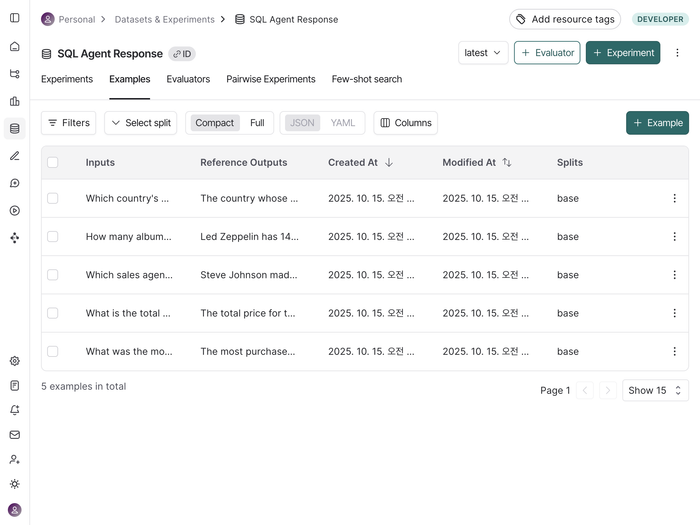
client.create_examples(inputs=inputs, outputs=outputs, dataset_id=dataset.id)위 코드를 실행하면 랭스미스에 /“Datasets & Experiments”에 아래와 같이 SQL Agent Response 가 새로 생성된 것을 확인할 수 있다.
from langchain_core.runnables import RunnableConfig
from random import random


# 에이전트의 SQL 쿼리 응답을 예측하기 위한 함수 정의
def predict_sql_agent_answer(example: dict):
    """Use this for answer evaluation"""
    config = RunnableConfig(configurable={"thread_id": random()})

    # 그래프를 실행하고 응답을 생성
    messages = agent.invoke({"messages": [("user", example["input"])]}, config)
    answer = messages["messages"][-1].content

    return {"response": answer}
response = predict_sql_agent_answer({"input": examples[0][0]})
response
{'response': 'The customers from the USA spent the most, with a total spending amount of 523.06.'}
# 답변 평가자 LLM-as-judge 정의
from langchain import hub
from langchain_openai import ChatOpenAI

# 평가자 프롬프트
grade_prompt_answer_accuracy = hub.pull("langchain-ai/rag-answer-vs-reference")

# LLM 평가자 초기화
llm = ChatOpenAI(model="gpt-4.1-mini", temperature=0)
answer_grader = grade_prompt_answer_accuracy | llm


def answer_evaluator(run, example) -> dict:
    input_question = example.inputs["input"]  # input: 질문
    reference = example.outputs["output"]  # output: 참조 답변
    prediction = run.outputs["response"]  # 예측 답변

    # 평가자 실행
    score = answer_grader.invoke(
        {
            "question": input_question,
            "correct_answer": reference,
            "student_answer": prediction,
        }
    )
    score = score["Score"]

    # 점수 반환
    return {"key": "answer_v_reference_score", "score": score}
from langsmith.evaluation import evaluate

# 평가 진행
evaluate(
    predict_sql_agent_answer,  # 평가시 활용할 예측 함수
    data=dataset_name,  # 평가용 데이터셋 이름
    evaluators=[answer_evaluator],  # 평가자 목록
    num_repetitions=3,  # 실험 반복 횟수 설정
    experiment_prefix="sql-agent-eval",
)
/Users/jeongsk/Workspace/Wantedlab/langchain-academy/venv/lib/python3.12/site-packages/tqdm/auto.py:21: TqdmWarning: IProgress not found. Please update jupyter and ipywidgets. See https://ipywidgets.readthedocs.io/en/stable/user_install.html
  from .autonotebook import tqdm as notebook_tqdm


View the evaluation results for experiment: 'sql-agent-eval-3f5a20b5' at:
https://smith.langchain.com/o/92657a09-ac43-48a7-9363-ed8025ba42d7/datasets/79ad9b12-0f1f-41ab-a5ca-01fdd2fb1984/compare?selectedSessions=b79faf82-1090-4698-a10b-5c956ba47522


15it [01:31,  6.11s/it]